Text message consent
Text capture is optional. Consent comes first.
This page documents the complete opt-in flow for Greta Text Message Capture. The program is for authenticated teachers who connect and verify their own mobile number.
Public reviewer evidence · v3 · consent 2026-07-13-v1
See the real consent step
The live control is inside Greta after sign-in. These two sanitized captures show the same synthetic number before and after the teacher gives separate, affirmative consent. The unchecked state includes a separate Continue without text messages action; the checked state shows Send code available after affirmative consent. This page is documentation only: it has no phone field, checkbox, submit action, or public enrollment path.
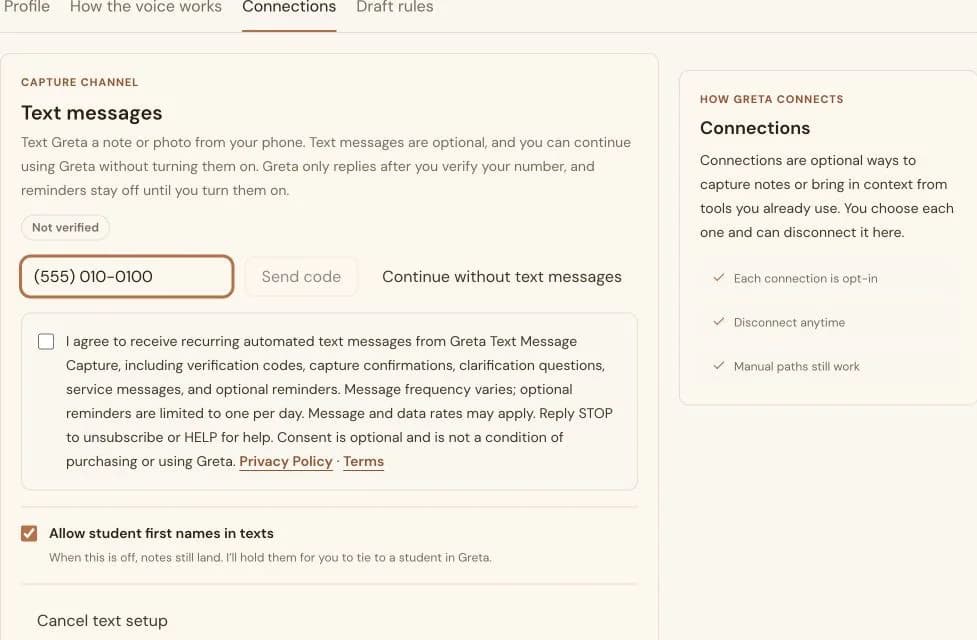
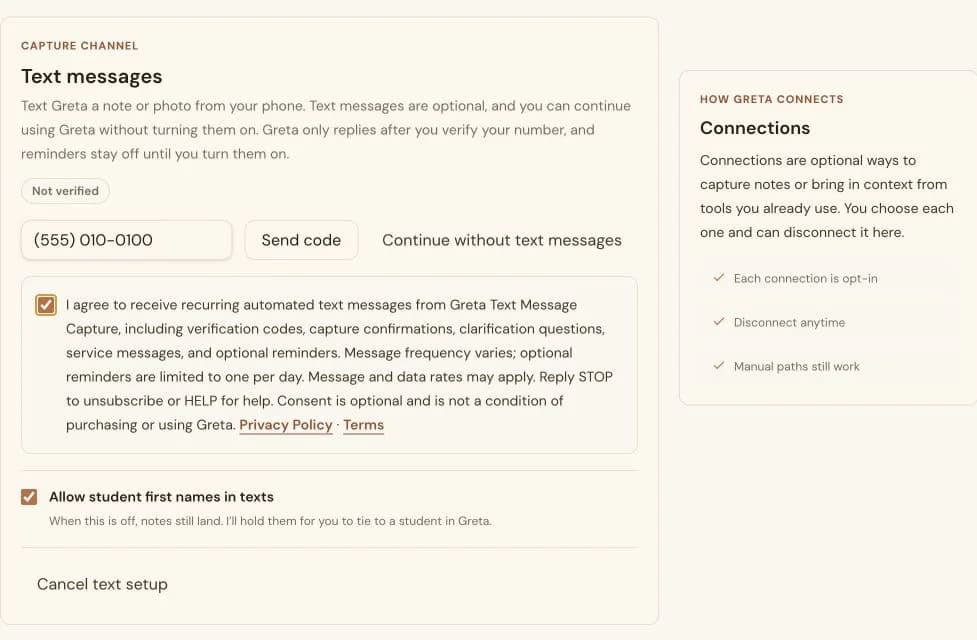
Disclosure shown before Send code
The exact consent language
I agree to receive recurring automated text messages from Greta Text Message Capture, including verification codes, capture confirmations, clarification questions, service messages, and optional reminders. Message frequency varies; optional reminders are limited to one per day. Message and data rates may apply. Reply STOP to unsubscribe or HELP for help. Consent is optional and is not a condition of purchasing or using Greta. Privacy Policy · Terms
The checkbox is never preselected. The teacher can continue without text messages, or check it before requesting a code; Send code remains unavailable until consent is given.
Verifiable flow
How a teacher opts in
- 1
Open the connection
The teacher signs in and opens Settings → Connections → Text messages.
- 2
Choose whether to receive texts
The teacher can leave the separate consent box unchecked and continue using Greta without text messages, or check it to set up SMS.
- 3
Verify only if opted in
Greta sends a one-time code only after affirmative consent. The teacher enters the code before text capture is enabled.
- 4
Stay in control
Reminders remain off until separately enabled. The teacher can reply STOP or disconnect the number in Settings.
Program details
- Messages: Verification codes, capture confirmations, clarification questions, service messages, and optional reminders.
- Frequency: Message frequency varies. Optional reminders are limited to one per day.
- Rates: Message and data rates may apply.
- Opt out: Reply STOP at any time or disconnect Text messages from Settings → Connections.
- Opt back in: Reply START only to re-opt in after STOP when the same number is still connected and previously verified. A new, changed, disconnected, or no-longer-verified number must use the Settings consent-and-verification flow.
- Help: Reply HELP or email support@teachgreta.com.
- Choice: SMS consent is not a condition of purchasing or using Greta.
Read the Privacy Policy and the Text messaging terms.